DATEV Connector
The DATEV Connector enables automated integration between Abacus and DATEV. Its purpose is to efficiently synchronize employee master data and make payroll documents directly available in Abacus.
The integration reduces manual effort in payroll processes while improving the employee experience by providing direct access to payslips within Abacus.
 The DATEV integration is included in the Interfaces module. Customers with this module can use the integration without additional license fees.
How it works
The integration is based on automated data exchange between Abacus and DATEV.
Data flow
- Abacus → DATEV
Transfer of HR master data and information, for example:
- Personal data
- Bank account details
- Tax and social insurance information
- New hires, changes, and terminations
- DATEV → Abacus
- Import of payroll statements (PDF)
- Automatic storage in the employee dossier
Synchronization
Synchronization is performed automatically once per day (overnight). Processing is asynchronous (no real-time synchronization).
Prerequisites
The following prerequisites must be met to use the DATEV integration:
- Use of a supported DATEV payroll system:
- DATEV LODAS
- DATEV Lohn und Gehalt
- Integration setup by Abacus (Consulting)
Authorizing the connection
The following applies when establishing the connection to DATEV:
- The connection must be established by a customer-side administrator.
- This administrator:
- authorizes the connection to DATEV.
- can disconnect or revoke the connection at any time.
- Abacus has no access to DATEV credentials.
Authentication is performed directly through DATEV (e.g. via SmartLogin or SmartCard).
License information
- The DATEV integration is included in the Interfaces module.
- Customers with this module can use the integration without an additional license.
Setup and usage
The setup is performed once and only with the support of consultants.
Click "Expand" to display the information.
Establishing the connection to DATEV
- Open the Integration Management in Abacus.
- Select the DATEV integration.
- Click Connect to DATEV.
- Sign in using your DATEV credentials.
Important notes
- Authentication is performed directly through DATEV.
- Only authorized administrators can establish the connection.
Initial synchronization
Before productive use, an initial synchronization is carried out:
- Matching employees between Abacus and DATEV.
- Required before daily synchronization can begin.
This step is usually performed by Abacus consultants.
Ongoing operation
Once the setup has been completed successfully, the integration runs automatically:
- Daily synchronization of employee master data.
- Automatic import of payroll statements.
- No manual interaction required.
Establishing the connection to DATEV
The connection between Abacus and DATEV is established by a customer-side administrator.
Procedure:
- Sign in to your Abacus solution and open the following URL extension (or the URL provided by your Abacus consultant): https://[YOUR-ABACUS-SOLUTION]/umantis-datev-connector/?companyId=[company id]
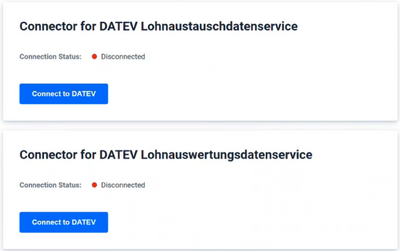
- The following screen is displayed. Click Connect to DATEV to establish the connection.
- Select the desired authentication method and click Next ("Weiter").
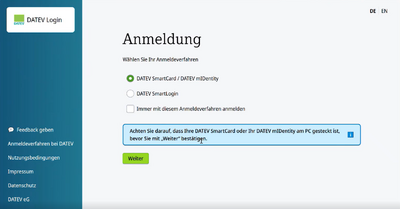
 The required login credentials are provided by the responsible customer administrator through DATEV.
Select the certificate used for authentication.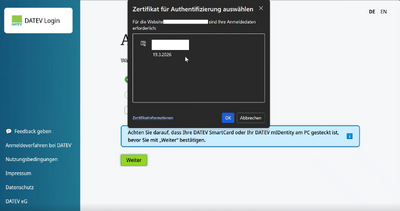
- The next step displays the authorization information provided by DATEV.
- After the connection between Abacus and DATEV has been successfully authorized, the current connection information is displayed.
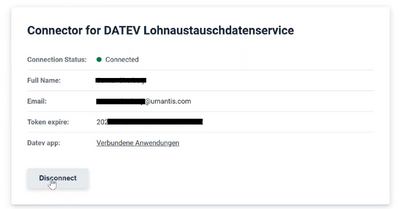
Via Connected Applications ("Verbundene Anwendungen"), you can access a detailed overview of all connected applications. From there, you can also revoke the granted permissions at any time.


Important notes
- The connection can only be established by an authorized customer-side administrator.
- The administrator is responsible for authorizing and managing the connection.
- The connection can be disconnected by the administrator at any time.
Limitations
The current version of the integration (Phase 1) does not yet support all DATEV features.
The following functions are currently not included:
- Real-time synchronization
- eAU (electronic certificate of incapacity for work)
- Time tracking
- Advanced payroll data and accounting services
Monitoring and error handling
The integration is monitored automatically.
Email notifications
If errors occur, defined recipients receive an email containing:
- Technical error messages
- Details for troubleshooting
Notes:
- One consolidated email is sent per synchronization run.
- Errors may affect individual employees while the overall synchronization continues successfully.
Data protection
- All data is stored in the Abacus data center.
- Processing is GDPR compliant.
- Technical logs do not contain personal data.